One customer payment covers several invoices. Here is how to apply it.
Start with the remittance, allocate the received amount, and separate invoice application from matching the bank deposit.
By the Duebird team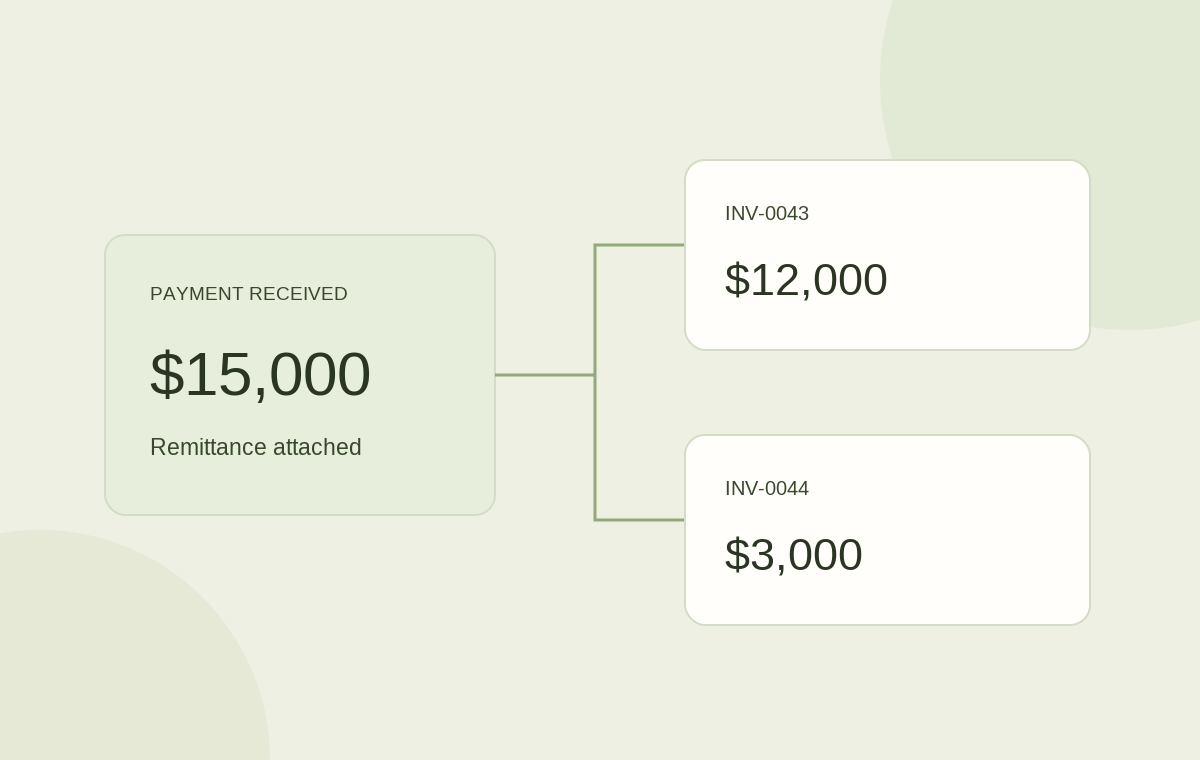
Use the remittance to identify the intended invoices, allocate the received amount, and review any difference. Applying cash to invoices is separate from matching the deposit to bank activity.
The bank shows $15,000 from a customer. Two open invoices are $12,000 and $3,000. The total is promising, but the amount alone is not enough to explain which balances should clear.
Start with the customer’s remittance, the payment received, and the open invoices. Show each allocation separately before recording it. Treat a suggested match as a proposal for review, and leave unexplained differences visible rather than clearing the wrong balance.
Start with the remittance and the receipt
A remittance describes what the customer intended to pay. The bank or payment record confirms what arrived. Keep the two together, with the payer, currency, amount, and transaction reference.
If the payment came from a parent company, an intermediary, or another entity, resolve that identity before applying it. Matching totals can help you investigate. It should not replace the source evidence when several combinations of invoices could produce the same amount.
See how Duebird reads remittances and the references your team reviews before allocating.
Review the proposed allocation
In this example, the remittance references INV-0043 and INV-0044. The proposed application uses the entire $15,000 and leaves no unapplied difference.
| Invoice | Open balance | Payment applied | Remaining |
|---|---|---|---|
| INV-0043 | $12,000 | $12,000 | $0 |
| INV-0044 | $3,000 | $3,000 | $0 |
| Total | $15,000 | $15,000 | $0 |
- Confirm that the invoice references belong to this customer.
- Use the currency and amounts stated in the remittance.
- Check for partial payments, credits, deductions, or duplicate records.
- Review the remaining balance and any unapplied amount before confirming.
Follow the steps to record and apply a customer payment after reviewing the proposed allocation.
Keep differences visible
If the customer sent $14,900, there is a $100 difference to explain. It might be an agreed deduction, an error, a withheld amount, or a fee. Do not silently mark the whole $15,000 as paid, and do not infer an authorized credit, write-off, or fee from the arithmetic alone.
Record the part you can support and leave the unresolved amount visible under your accounting policy. The collection conversation should know what has already been received and what remains under discussion.
- A partial payment leaves part of an invoice open.
- A short payment needs a reason before anything is cleared.
- A missing reference needs the remittance or the customer’s email.
- An overpayment stays on the account until someone decides what it covers.
Separate invoice application from bank matching
Applying a payment answers which customer invoices it settles. Matching a bank deposit answers which recorded receipts correspond to the bank transaction. These are connected tasks, but they are not always the same record.
For example, several customer receipts may be combined into one deposit. A processor may also settle a batch after deducting fees. Preserve the relationship between the gross receipts, fees, and bank amount so the team can reconcile the deposit without reopening correctly applied invoices.
Return a reviewed result to accounting
Duebird keeps incoming remittances and proposed invoice applications with the customer account. Finance can review the received amount, invoice references, and difference before the confirmed status is returned through the accounting integration.
During setup, agree how payment records, invoice balances, deposits, and fees are represented in your ERP. A clear sync design prevents the collection team and accounting system from disagreeing about what the customer still owes.
Explore cash application and reconciliation, from the remittance to the reviewed result.
Use references to allocate the customer payment. Reconcile the related bank deposit as a connected, separate step.
Sources and further reading
Official references for the concepts and software examples discussed in this article.